Tampilkan postingan dengan label ps1. Tampilkan semua postingan

Download Emulator PS1 ePSXe 1 7 0 Tutorial

Senin, 05 September 2016

0 komentar

ePSXe 1.7.0
IGM | Download Emulator PS1 ePSXe 1.7.0 + Tutorial | File Size : 13,88 MB 

IGM | Download Emulator PS1 ePSXe 1.7.0 + Tutorial | Kali ini saya akan share software yaitu ePSXe 1.7.0, yaitu Emulator PS1 yang berfungsi untuk memainkan game-game PS1 yang berformatkan .ISO. Jadi kalian tidak perlu lagi membeli PS1 yang harganya masih ratusan ribu. Cukup menggunakan ePSXe V1.7.0 ini kamu sudah bisa memainkan semua game PS1 di PC dengan cara mendownload .ISO file game yang ingin anda mainkan.Contoh game PS1 yang asik untuk dimainkan seperti : Harvest Moon Back to Nature, Tenchu 2, Digimon Rumble Arena, Final Fantasy IX, Crush Gear Turbo dan masih banyak lagi.


SCREENSHOTS
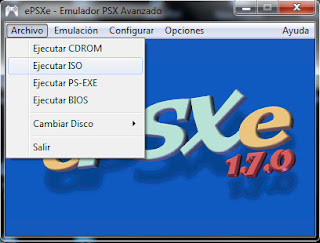

Screenshot ePSXe 1.7.0


Langsung saja saya berikan link downloadnya dibawah ini beserta tutorial cara memakai emulatornya :


[Download Emulator PS1 ePSXe 1.7.0]
size : 13,88 MB | Pass : igaming


Link Download ePSXe 1.7.0


TUTORIAL


  • Download terlebih dahulu ePSXe 1.7.0 
  • Extract File ePSXe 1.7.0
  • Untuk memainkan game .ISO, Klik File >> Run ISO 
  • Pilih game yang ingin dimainkan yang berformat *.ISO, *.BIN, *.IMG, *.CUE, *.MDS, *.CCD
  • Tunggu Game Load >> Enjoy


Untuk Pengaturan yang lainnya seperti : Video, Audio, Joystick, Memory Card dll bisa diconfigursikan sendiri.

Read More..

How To Delete Game Saves Off a PS1 Memory Card

Rabu, 26 Februari 2014

0 komentar


A memory card can be inserted into a ps1 gaming console to save game progress you have made in games you play on the console. However, the ps1 memory card can get full up and have no free storage blocks for more game saves to be saved onto the ps1 memory card, so you will need to delete the saves that you no longer use or need. 

Instructions:

1)Make sure the psone console is powered off, then insert the memory card you want to delete game saves off into a free slot on the ps1 console. The memory card slot will be seen on the front of the console, it will be a flap that will say "Memory Card" on it.

2)Once you have inserted the memory card into the console, press the "Eject" button down, then the disc flap will open, if it has a game disc inside it, then remove it from the console and place it in a plastic sleeve, to prevent it getting scratched and dusty. Then close the flap.

3)Turn on the Playstation 1 console on, this is by pressing down the "Power" button, then select "Memory Card" from the main menu that will come up on the TV screen. All the game save data files that are stored on the psone memory card will be shown on screen. Use the d-pad to select which game save you want to erase, then press the "X" button on the controller and select the "Delete" option, repeat this for all of the saves you want to delete and remove, to free up space.
Read More..

Copyright © 2010 Free Game PC | Powered By Blogger